Small screens
The chilichip console has a 128×128 pixel screen, about 27 mm wide. There is no room for web patterns, so the system gets simpler. The idea stays the same: black, bone, one red thing.
Examples, not the final OS
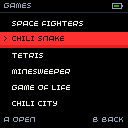
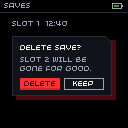
The pictures on this page show how the system looks at 128×128. They are drawn with the real console font. The console OS itself is designed in chili-chip/32blit-sdk.
Colour
The console uses a short list of roles. The background is pure black: on the OLED a black pixel is off, which saves power and looks deepest.
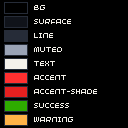
| Role | Colour | Hex | RGB565 | C++ |
|---|---|---|---|---|
| bg | black | #000000 |
0x0000 |
chilichip::console::bg |
| surface | ink-2 | #10131a |
0x1083 |
chilichip::console::surface |
| line | ink-4 | #262c38 |
0x2167 |
chilichip::console::line |
| text | bone | #f4f1ea |
0xF79D |
chilichip::console::text |
| muted | mist | #9aa3b5 |
0x9D16 |
chilichip::console::muted |
| accent | chili | #ff3030 |
0xF986 |
chilichip::console::accent |
| accent-shade | chili-shade | #e42020 |
0xE104 |
chilichip::console::accent_shade |
| on-accent | on-chili | #140407 |
0x1020 |
chilichip::console::on_accent |
| success | leaf | #2eac00 |
0x2D60 |
chilichip::console::success |
| warning | amber | #ffb347 |
0xFD88 |
chilichip::console::warning |
| danger | chili | #ff3030 |
0xF986 |
chilichip::console::danger |
All of these are in chilichip.hpp.
| Rule | Why |
|---|---|
Background is bg (black). Use surface only for panels on top. |
Black pixels are off on the OLED. |
Text is text or muted. |
Both pass 4.5:1 on black. |
Text on red is on-accent. |
Bone on red is hard to read at 8 px. |
One accent area per screen: the selection. |
Red means "you are here". |
accent-shade is a 2 px strip under a red area. |
The same lit face and shaded face as the logo. |
Show state with a mark too (> or an icon). |
Colour alone fails for some people and on some panels. |
The display stores colours as RGB565, so they shift a little. Rgb::rgb565() in the header gives the stored value. The console comes with an OLED or a TFT screen. The TFT is less saturated and its black is dark grey, so check both before you ship.
Grid
| Thing | Size |
|---|---|
| Screen | 128×128 px |
| Base unit | 8 px. The screen is 16×16 units. |
| Gaps | 2, 4, 8 or 16 px |
| Side margin | 4 px |
| Status bar | 12 px high, with a 1 px line under it |
| List row | 16 px high. Six rows fit under the status bar with room for hints. |
| Hint line | The last 12 px: what A and B do |
| Lines and borders | 1 px |
Everything sits on whole pixels. Nothing is scaled, rotated or smoothed.
Type
The console has its own bitmap font (minimal_font in the 32blit SDK): 8 px high, variable width, capitals only. The web fonts are not used here.
| Rule | Detail |
|---|---|
| About 20 characters fit on a line. | Measure real strings: letters are 2 to 7 px wide. |
| Line height is 9 px or more. | 8 px glyph plus 1 px gap. |
| No bold, no sizes. | Use text and muted, position and the red selection to show order. |
| Keep labels to one or two words. | "Delete", "Keep", "Open". |
| Do not scale the font by 1.5. | Only whole steps: 2× for a title if you must. |
Shape and depth
The web rules carry over, in pixels.
| Web | Console |
|---|---|
| Square corners | Square corners. Never fake a round corner with pixels. |
4px 4px 0 button shadow |
A 2 px accent-shade strip under the red area |
| Card shadow | A filled chili-deep rectangle, 4 px down and right |
| Cut corner 12 px | Cut corner 6 px, on dialogs only |
| Focus outline | The red selection row or a 1 px text border |
Motion and burn-in
| Rule | Why |
|---|---|
| Move in whole pixels and finish within 150 ms. | Slow fades look muddy at this size. |
| Do not blink faster than 2 times per second. | It is tiring and can be unsafe. |
| Keep bright static areas small. | An OLED wears where it stays bright. Bars are line on black, not filled. |
| Dim, then sleep, when idle. | Saves the panel and the battery. |
Logo
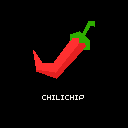
The vector logo does not survive below about 24 px. On the console, and for favicons, use a pixel version with hard edges.


Drafts
These pixel logos are made by a script from the SVG. They are good enough to try things out. The 16 px one needs hand tuning before it ships. See Open questions.
Make the pictures again
The examples are drawn by tools/console_mockups.py from the tokens and the SDK font. Run it after you change a console colour:
pip install pillow
python3 tools/console_mockups.py ../32blit-sdk/32blit/graphics/font.cpp